
Jira Worklogs by User and Day: How to See Who Worked on What
Jira has no worklog report by user and day. How to build one from the worklog REST API, why JQL falls short, and a free grid of who logged what each day.
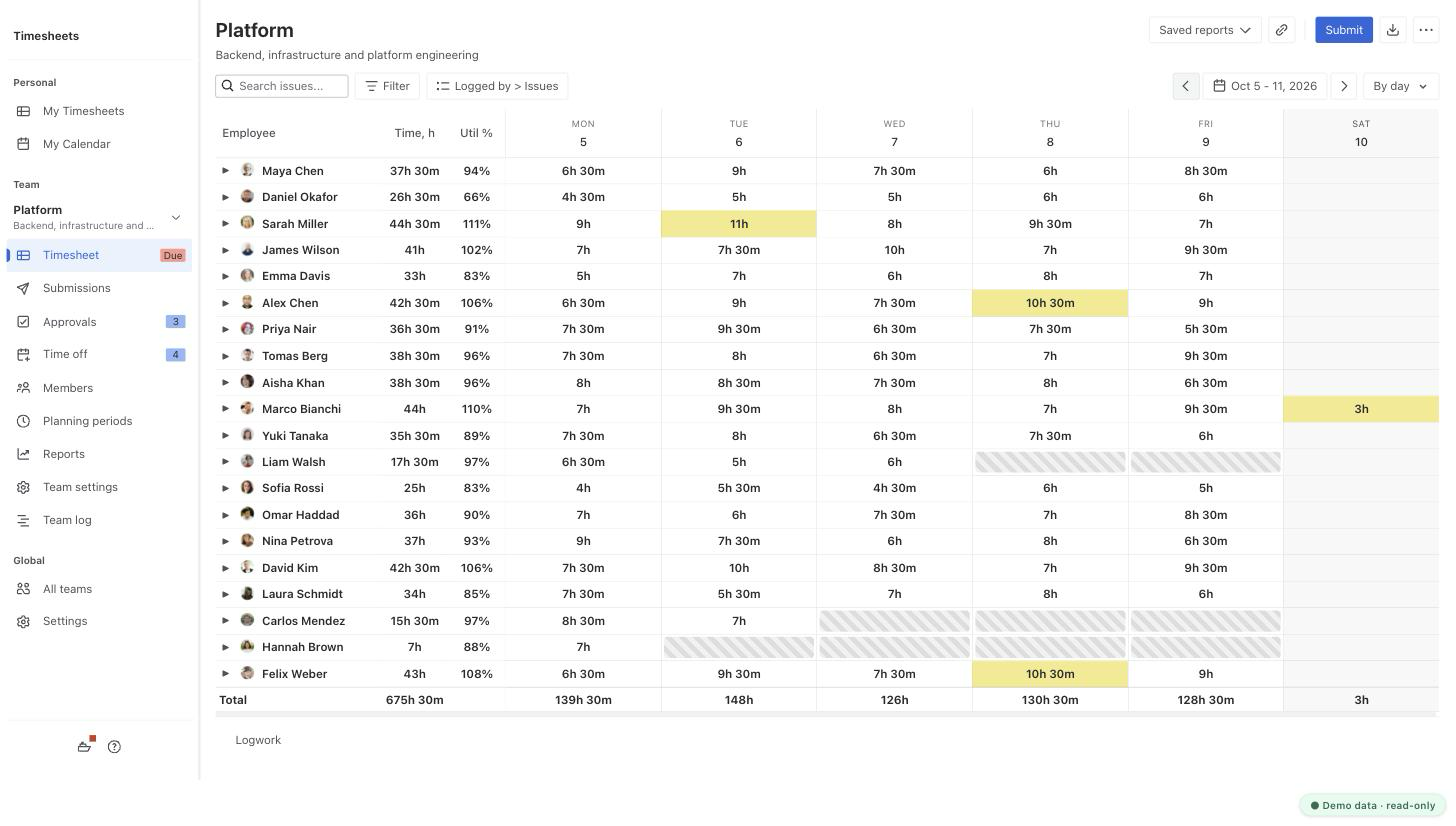
You can make people enter time when an issue closes, and you can pull every worklog through the REST API and pivot it yourself. Timesheets for Jira shows the grid without a script, for free: one row per person, one column per day.
Making time logging mandatory, and what it gets you
In a company-managed project, Jira can require a time entry when an issue moves to Done. Add a transition screen with the Log work field, then a Validate Details rule that checks Time Spent. Atlassian lists the steps in this KB article.
Team-managed projects have no such validator. The workaround Atlassian suggests is a separate number field that must be above zero before the transition. That field is not a worklog and never shows up in time reports.
The rule fires once, at the end. You get one entry per issue, typed from memory on the day it closed, so four days of work show up as one block of hours on day four.
Why JQL does not give you hours per person
JQL finds issues, not hours:
worklogAuthor = currentUser() AND worklogDate >= startOfWeek()
The Time Spent column on the result is the total for everyone on that issue since it was created. If three people worked on a story, you see their sum, on no particular day.
These clauses also have a known problem right now. Since mid-September 2026, app vendors in the Atlassian developer community have reported incomplete worklogDate results. Atlassian support told them a regression in search indexing kept only the first 100 worklogs of an issue and that a fix would ship in a coming release. As of October 20, 2026 there is no public note that it shipped, so check JQL-based worklog numbers against another source.
Getting worklogs by user and day from the REST API
The REST API has everything you need (docs):
GET /rest/api/3/worklog/updated?since=<Unix time in ms>returns the IDs of worklogs created or changed after that moment, 1000 per page. FollownextPageuntillastPageis true.POST /rest/api/3/worklog/listwith up to 1000 of those IDs returns each worklog with its author,starteddate andtimeSpentSeconds.
since works on the update time, so filter on started after the download. Then pivot: people in rows, days in columns, hours in cells.
import pandas as pd

rows = [{
    "person": w["author"]["displayName"],
    "day": w["started"][:10],
    "hours": w["timeSpentSeconds"] / 3600,
} for w in worklogs]

grid = pd.DataFrame(rows).pivot_table(
    index="person", columns="day", values="hours", aggfunc="sum", fill_value=0)
grid.to_csv("who-worked-each-day.csv")
The account that runs the script only gets worklogs it is allowed to see, so use one that can browse every project you report on. Worklogs changed in the last minute before the call are not returned yet. And someone has to run the script every week and fix it when it breaks.
For the other native routes, CSV export and the Time Tracking report among them, see Jira Worklog Reports: What Native Jira Gives You and Where It Stops.
Keeping people logging daily
A scheduled Jira Automation rule at 17:00 can look for people with no worklog today and send them a reminder. It relies on the same worklog JQL, so while the regression above is open it can miss people or nag the wrong ones.
From December 3, 2026 it also has a meter. Every trigger, condition, action, branch and loop a rule runs counts as a step against your plan's allowance, and extra steps cost $0.50 per 1,000 (Atlassian Support). A rule that runs every working day and branches per person adds steps for every member, every day.
The habit itself comes from people seeing their gaps. A weekly grid sent to the team does more than a validator on Done.
The same grid in Timesheets for Jira
The Team Timesheet page shows every member's worklogs for a team. Set the grouping to Logged by > Issues, keep the columns on By day, and you have the grid from the top of this page: one row per person with hours per day, a total per person and a total per day.
Expand a person to see which issues the hours went to. Click a cell with hours to see the worklogs behind it, with the comment and who logged them. The day columns cover up to a month; for two months switch the columns to By week or By month. Export the view to Excel, CSV, PDF or iCal.
For the daily habit:
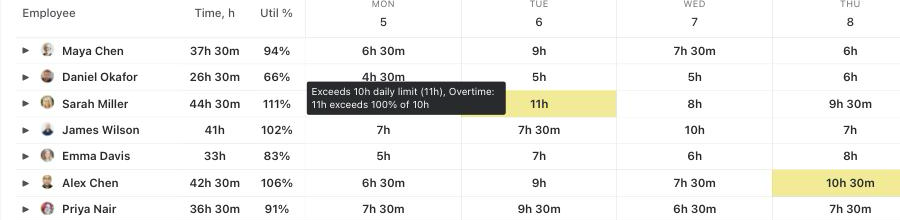
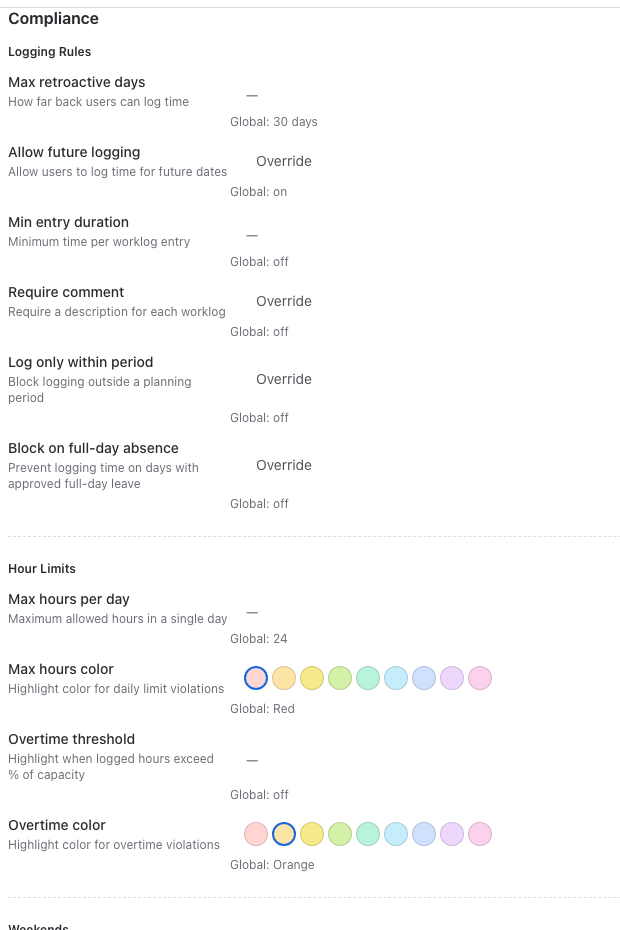
- Compliance rules reject a worklog dated more than a set number of days back, so time is logged while people still remember it. A day over the hours limit or logged on a weekend gets a colored cell in the grid, and the tooltip says why.
- Planning periods give each week or month a deadline. Members who have not submitted get a reminder email the day before the period closes, and approvers review what was submitted.
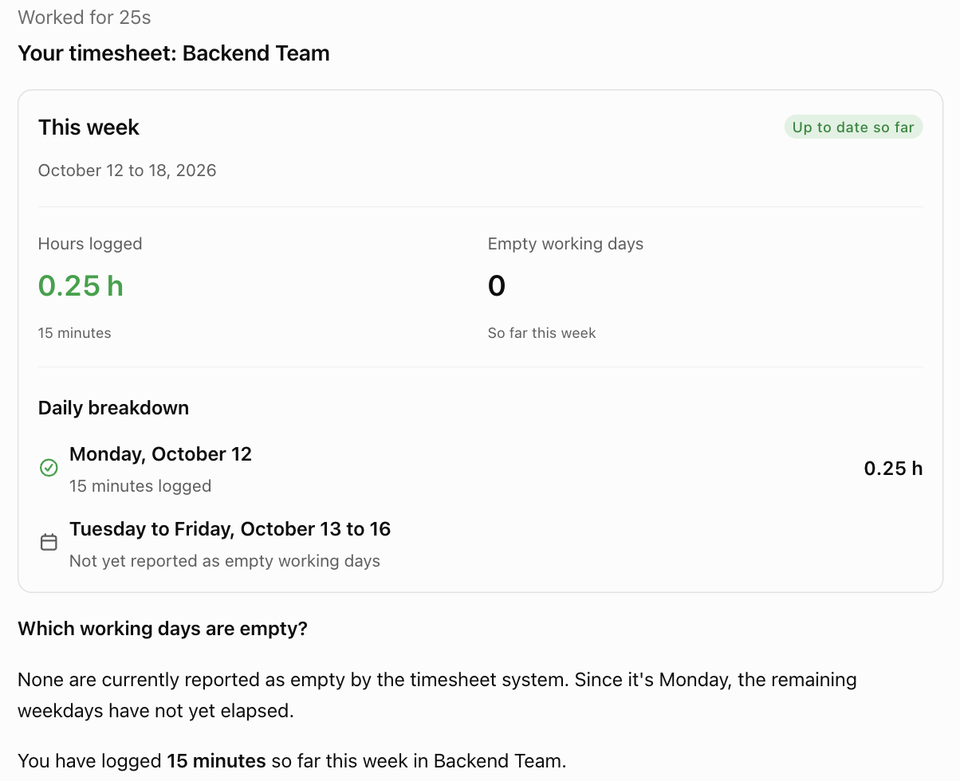
- The AI assistant answers "Who hasn't logged time this period?" by comparing each member's hours with the hours expected for the working days so far. Each person can ask it for their own empty working days, in Rovo or from ChatGPT and Claude over MCP.
All of it reads and writes ordinary Jira worklogs, so the numbers match the Work log tab on each issue. Timesheets for Jira is free on the Atlassian Marketplace.
Related: How to Set Up Timesheet Approvals in Jira, Exporting Jira Timesheets to Excel.