
How to Export a Jira Timesheet to Excel: Native Export, REST API, or an App
Native Jira export gives one total per issue, not hours per person per day. What CSV, the REST API and timesheet apps each give you in Excel.
Finance asks for one Excel file by the 3rd: hours per person, per project, for the closed month. Jira has every number you need in worklogs, yet the built-in export cannot turn them into a timesheet you can hand over in Excel.
What native Jira export gives you
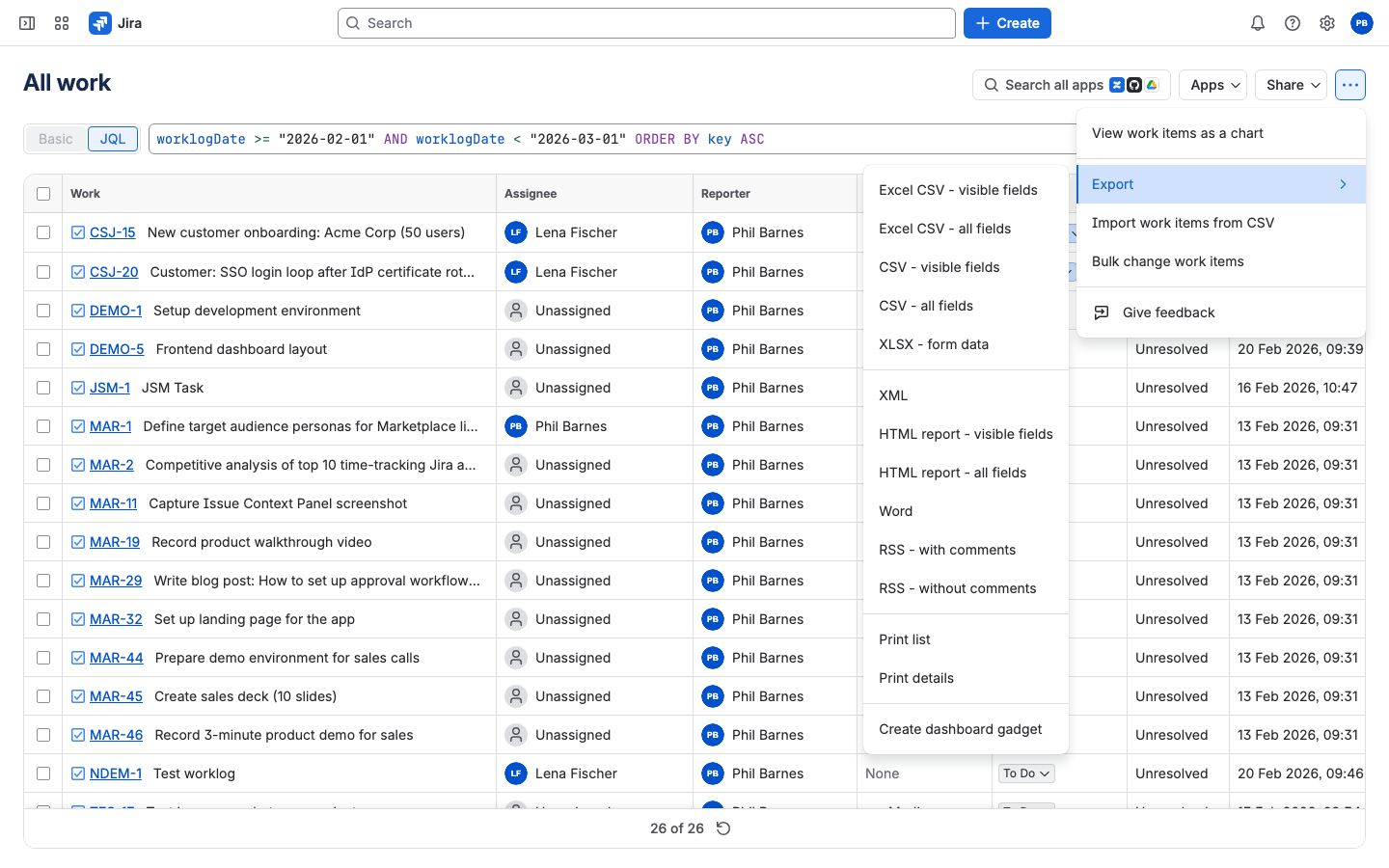
Build a filter in issue search and open ••• > Export. The Excel items in that submenu are "Excel CSV - visible fields" and "Excel CSV - all fields": the issue export comes as CSV that Excel opens (Atlassian Support). The same submenu also lists plain CSV, XML, an HTML report, Word and a few others, plus an item labelled "XLSX - form data". Each CSV gives one row per issue.
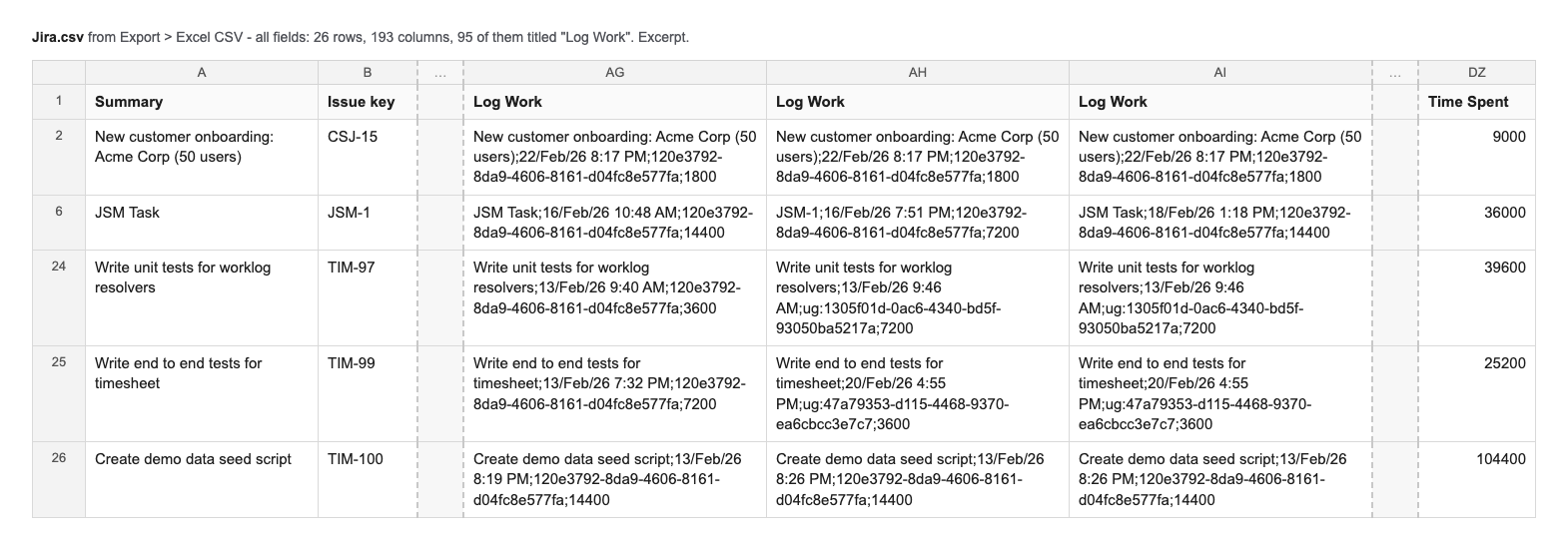
Time Spent is the total logged directly on that issue, in seconds. Σ Time Spent adds its sub-tasks. Neither splits by person or by date (Atlassian knowledge base). For a longer breakdown of what native Jira worklog reports can and cannot show, see Jira worklog reports.
The all-fields CSV also adds Log Work columns, one per worklog. Each cell is a single string, comment;date;user key;seconds, where the user part is Jira's internal user key, not a name or an accountId. Every row gets as many Log Work columns as the busiest issue has worklogs: one issue with 95 worklogs gives 95 Log Work columns. The date is when the worklog was created, not the day the work was logged for (JRACLOUD-77926). On our test site, work done on February 16 shows up in the cell as 22/Feb/26. Time logged for August 29 but entered on September 2 lands in September. Getting hours per person for August out of this means splitting strings and unpivoting columns every month.
Exporting worklogs through the Jira REST API
The REST API gives you raw worklogs without admin rights: an API token and Browse projects are enough. One caveat: worklogs restricted to a project role or group are returned only to members of that role or group, so a script run by one person can silently miss entries.
GET /rest/api/3/issue/{issueIdOrKey}/worklog returns the entries for one issue and accepts startedAfter and startedBefore, so you can ask for August only. For recurring exports, GET /rest/api/3/worklog/updated lists ids of worklogs changed since a timestamp, 1,000 per page, and POST /rest/api/3/worklog/list fetches up to 1,000 of them per call. Deletions come from GET /rest/api/3/worklog/deleted with the same paging (REST API v3 reference, checked September 23, 2026). Both feeds skip changes from the last minute before your request, so a run right after someone logs time can miss that entry.
Pagination, time zones and mapping accountId to a display name are yours to handle. That is fine for a one-off export or a BI pipeline a developer maintains. For a monthly finance file, someone has to keep the script running every month.
Exporting a Jira timesheet to Excel with an app
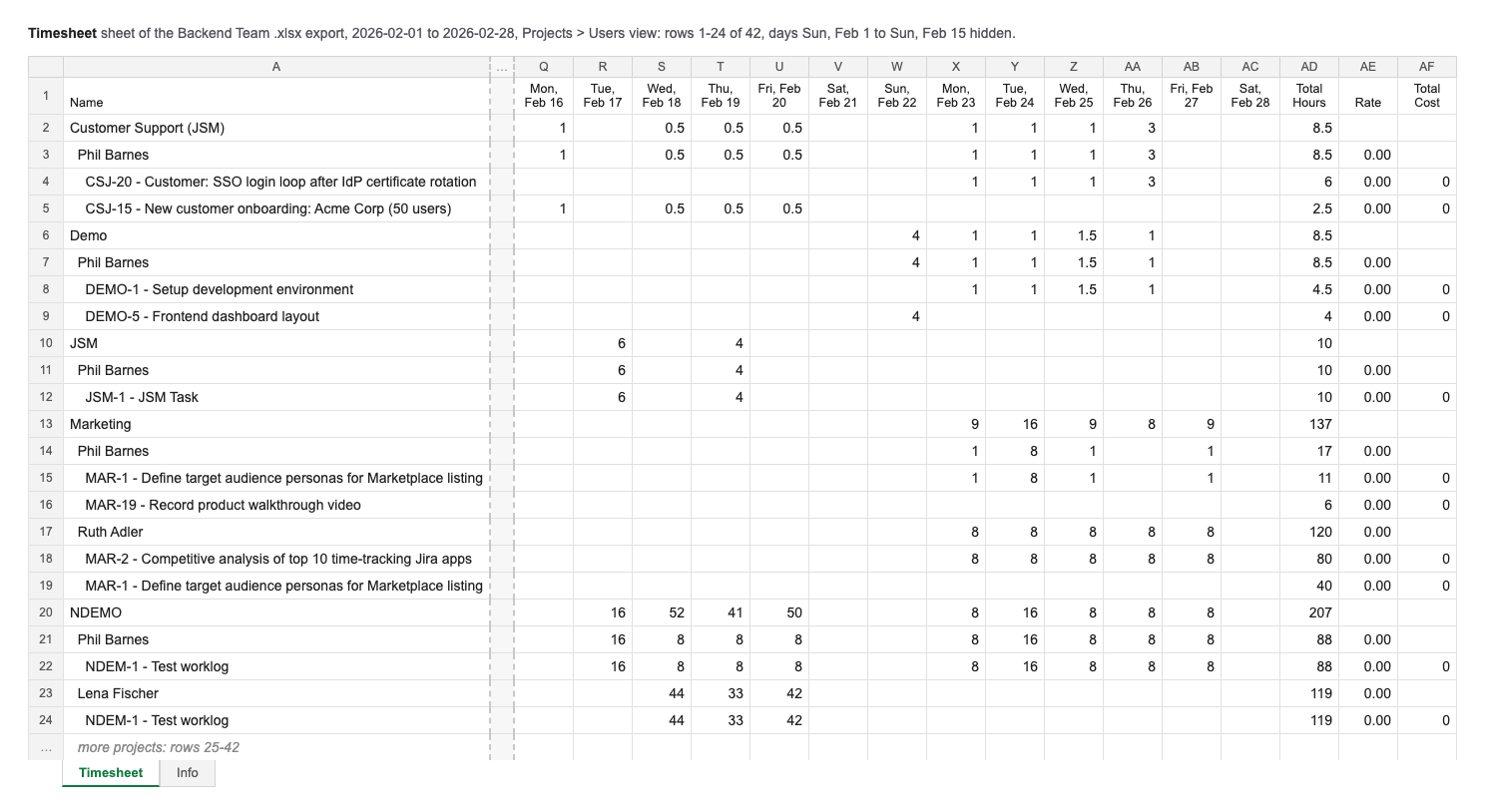
In our app, Timesheets for Jira, you get hours per person per project by switching the team timesheet to the Projects > Users view, then pressing Export and choosing XLSX and the date range. Full disclosure: we build it, and it is free. The file follows the view on screen. In Projects > Users that means three levels: a row per project, a row per person under it, and that person's issues under each person. Days are columns, followed by Total Hours. Levels show by indentation only; the sheet has no formulas or styling. The other views (Users > Issues by default, Projects > Issues, Epics > Issues, Issue Types and Issues only) export the same way.
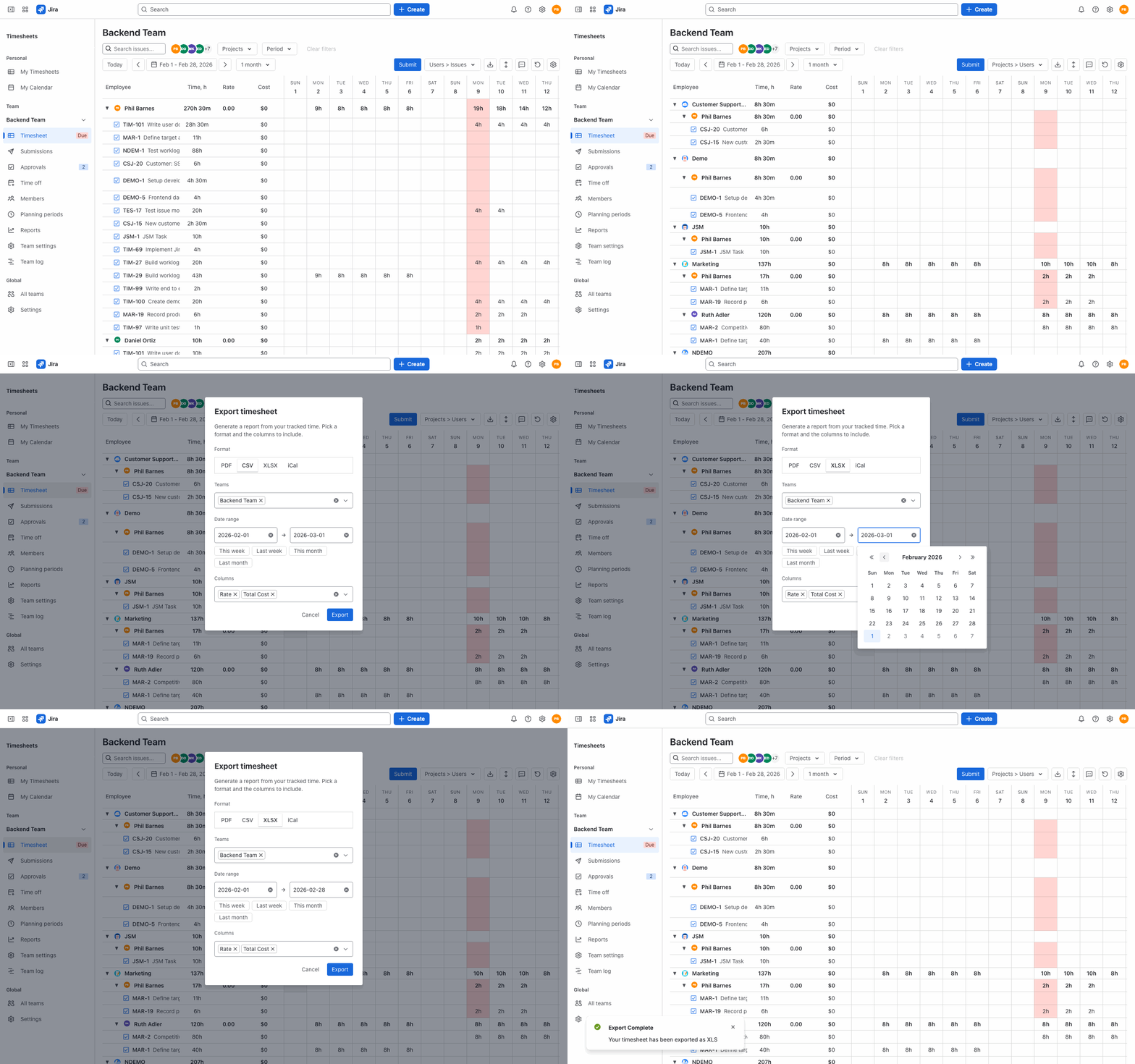
Optional columns add email, project key and name, issue type, epic key and name, status, and original and remaining estimates in hours. Managers and Jira admins also get Rate and Total Cost, so finance can price the hours from the same file. Team leads do not get these two columns. The .xlsx has two sheets: Timesheet holds the grid, Info holds the team, export date, period, total hours and member count. CSV, PDF and iCal are also available.
Beyond the file, a timesheet app adds timesheet approvals, a capacity report, and an email reminder, the day before the submission deadline, to people who have not submitted their timesheet.
Before you send it to finance
Check the period boundaries: a worklog started late in the evening can land on a different day depending on which time zone the tool uses, and at month end that moves hours into the wrong month.
Check the number format. Our export writes decimal hours, unrounded, so 20 minutes is 0.3333…, and it never writes hours and minutes. Set the number format in Excel before sending. Other tools may write 1h 30m.
Check who is missing. In a native or REST export, a person who logged nothing produces no rows. In our Users > Issues export they appear as a blank row, unless "Hide empty timesheets" is on, which is easy to miss. Our capacity report (Reports, Capacity tab, for leads and above) shows the gap: expected against actual hours per member, with holidays and approved absences already excluded.
Limitations
Our export writes values in a fixed layout, the one of the view you chose. It does not fill your own Excel template and adds no formulas or pivot tables. One export covers up to one month and up to 1,000 worklogs, so a large team may need to export in parts. The REST route needs code and an API token, not admin rights. And no export fixes data that was never logged: if the team logs time weekly from memory, the file will be tidy and wrong.
Facts and links checked on September 23, 2026, against Jira Cloud, Atlassian's public documentation and the current version of the app.