
How to Set Up Timesheet Approvals in Jira (Step by Step)
Jira timesheet approvals in five parts: submit, review, approve or reject, snapshot, audit trail. Native Jira has none; a free app adds all five.
Your finance team needs approved timesheets by the 3rd of each month. Jira has worklogs on every issue, so the hours are there. What Jira does not have is any way to approve them: no submit button, no approver, no lock. If you are reading this, someone probably just discovered that during month-end close.
This guide covers what a working approval process actually consists of, how far you can get with native Jira (short answer: not far), and a step by step setup when you need the real thing.
What "timesheet approval" actually means
Approval sounds like one action, but a process that survives an audit has five parts:
Most teams only think about step 3. Steps 4 and 5 are what your auditor or client will actually ask about.
What native Jira gives you
Jira Cloud stores worklogs and shows them on each issue. The Time tracking report compares estimates to time spent per version. That is the full inventory. None of the five parts above exist: there is no submitted state for a week of work, no approver role, no lock, and no approval history.
What teams build instead is the spreadsheet workflow: export worklogs to Excel, email the file to a manager, approve by reply. It works for about two months, then breaks in predictable ways. Hours change after the export, and nobody notices because nothing is locked. The email thread becomes the audit trail, which means there is no audit trail. And the export itself is easy to get wrong, because JQL worklogDate filters issues, not worklogs, so an issue with one January entry drags all its December hours into the January report. We wrote up that trap in detail in our worklog reports guide.
To be fair about scope: this is not a Jira flaw. Jira tracks work. Payroll workflow was never its job. But if approval is a compliance requirement for you, native Jira alone does not meet it, and it is better to know that before the auditor does.
Design the flow before you configure anything
Every failed approval rollout we have seen skipped this step. Four questions to answer on paper first:
Who approves? Team lead, project manager, or both? A lead knows whether the work happened. Finance knows whether it is billable. Those are different checks, and pretending one person does both is how errors get approved.
By team or by project? If people work across projects, project-based approval means three approvers per person per week. Team-based is usually saner, but pick one deliberately.
Can people approve their own hours? Auditors ask this question first. If your approver also logs time, you need a rule for who approves the approver.
What happens after a reject? Someone fixes the hours and re-submits. If that loop is not defined, rejected timesheets just sit there, and month-end close waits on them.
The answers fit on one sheet of paper, and they look something like this:
Setting up approvals step by step
The walkthrough below uses Timesheets for Jira, which is currently free while in early access and built on Forge, so worklogs stay native Jira worklogs. The same logic applies in any approval tool, only the buttons differ.
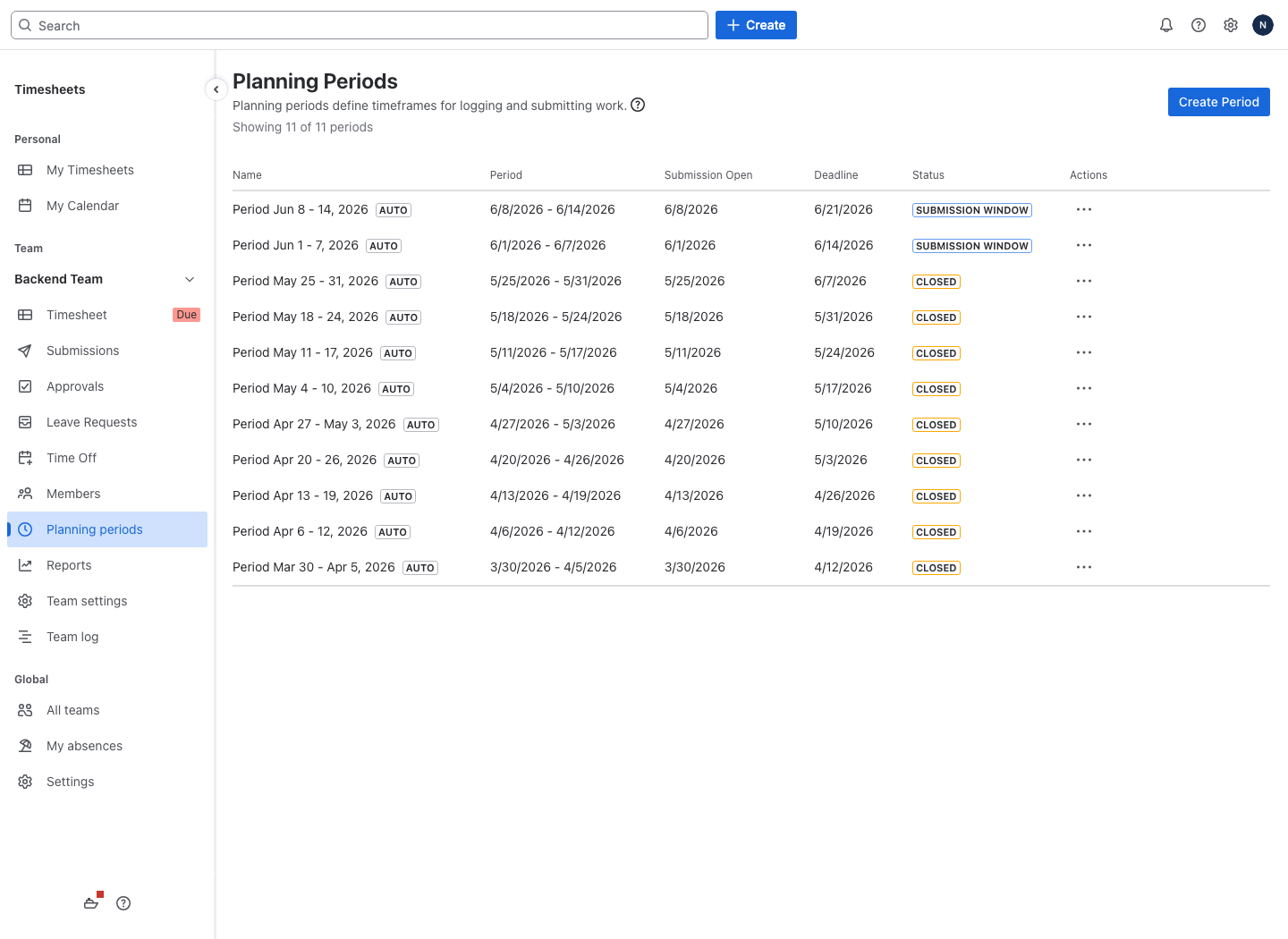
Step 1: Define planning periods. Weekly or monthly with automatic generation, or fully manual periods if your cycle is unusual; match whatever payroll runs on. The period is the unit people submit and approvers approve. Monthly periods mean fewer approvals but bigger corrections when something is wrong; weekly catches errors while people still remember the week.
Step 2: Assign approvers by role. Map who approves for each team. Approvers can be a role (any team lead) or named people; role-based assignment survives personnel changes, hard-coding named approvers does not.
Step 3: Turn on the self-approval ban. One toggle in the app's global settings, and the answer to the auditor's first question becomes "no, enforced by the system": the block applies even when the approver is reviewing their own submission in a chain.
Step 4: Set the chain. For a single stage, the lead approves and the submitted hours stay in the snapshot. For two stages, see the next section.
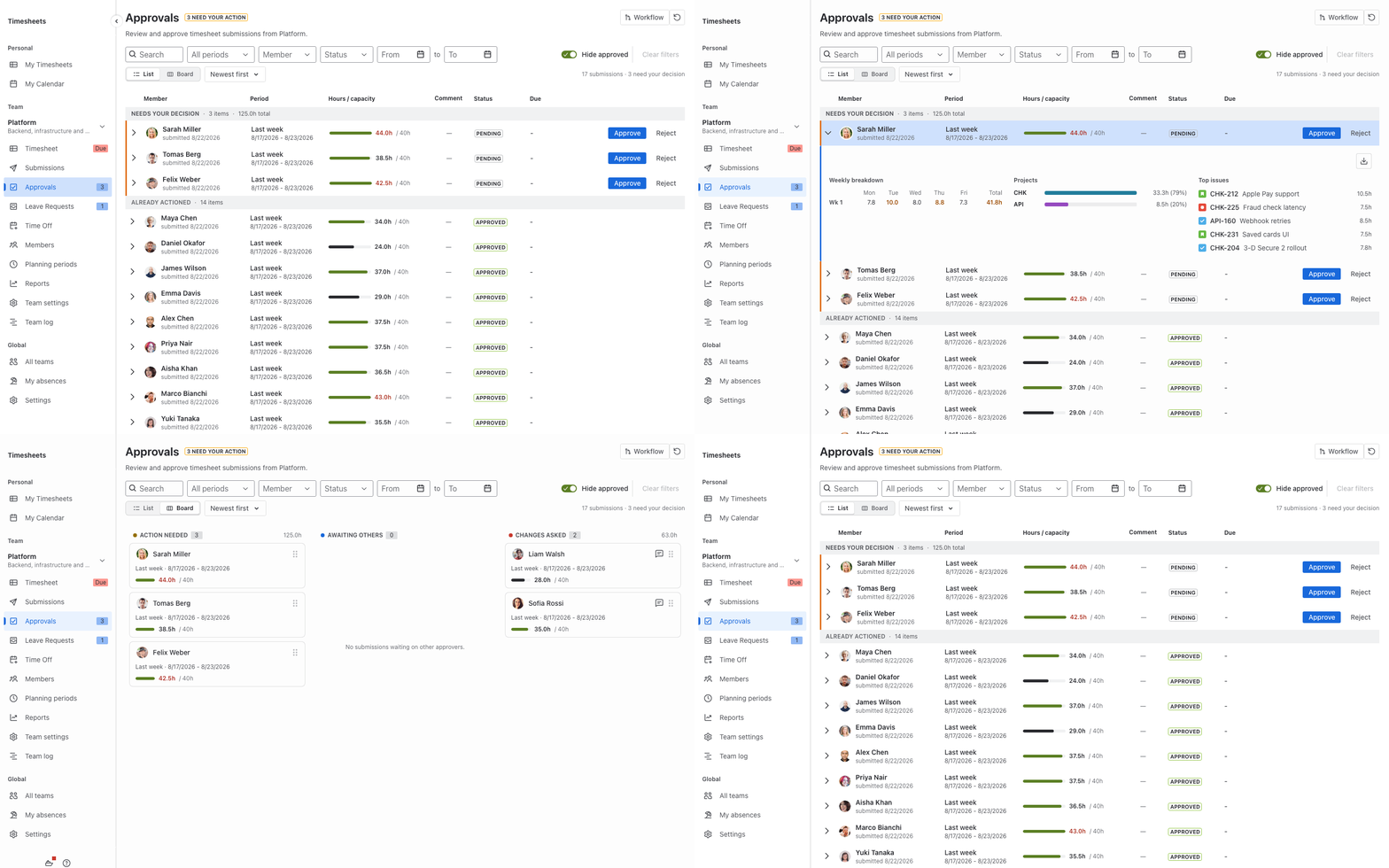
Step 5: People submit, approvers act. Submitting freezes a snapshot of the hours, so everyone reviews the same fixed numbers. The approver sees a table of submitted timesheets for the period with per-person totals against capacity, expands any row into the per-day and per-project breakdown, and approves or rejects in one click. A rejection requires a written reason, which the person receives by email, fixes the hours, and resubmits.
Two limitations to know before you commit. Reports and approvals are team-scoped: you create a team and add people to it first, so an ad-hoc report across arbitrary users needs that setup step. And billing stops at exports: per-member hourly rates with rate and total-cost columns are there for finance, but nothing generates a client invoice, and there is no Server or Data Center version, only Cloud.
Multi-stage chains: when one approver is not enough
The common enterprise pattern is two stages: the team lead confirms the work happened, then finance confirms the period can close. Setup is the same as a single stage plus a second link in the chain. Within a stage you can have parallel approvers with either semantics: "any one" mode, where two leads share a team and either can approve, or "all" mode, where every named approver has to sign off. Policies live per team in Team settings, and changes apply to new submissions only: anything already in flight keeps the policy it was submitted under.
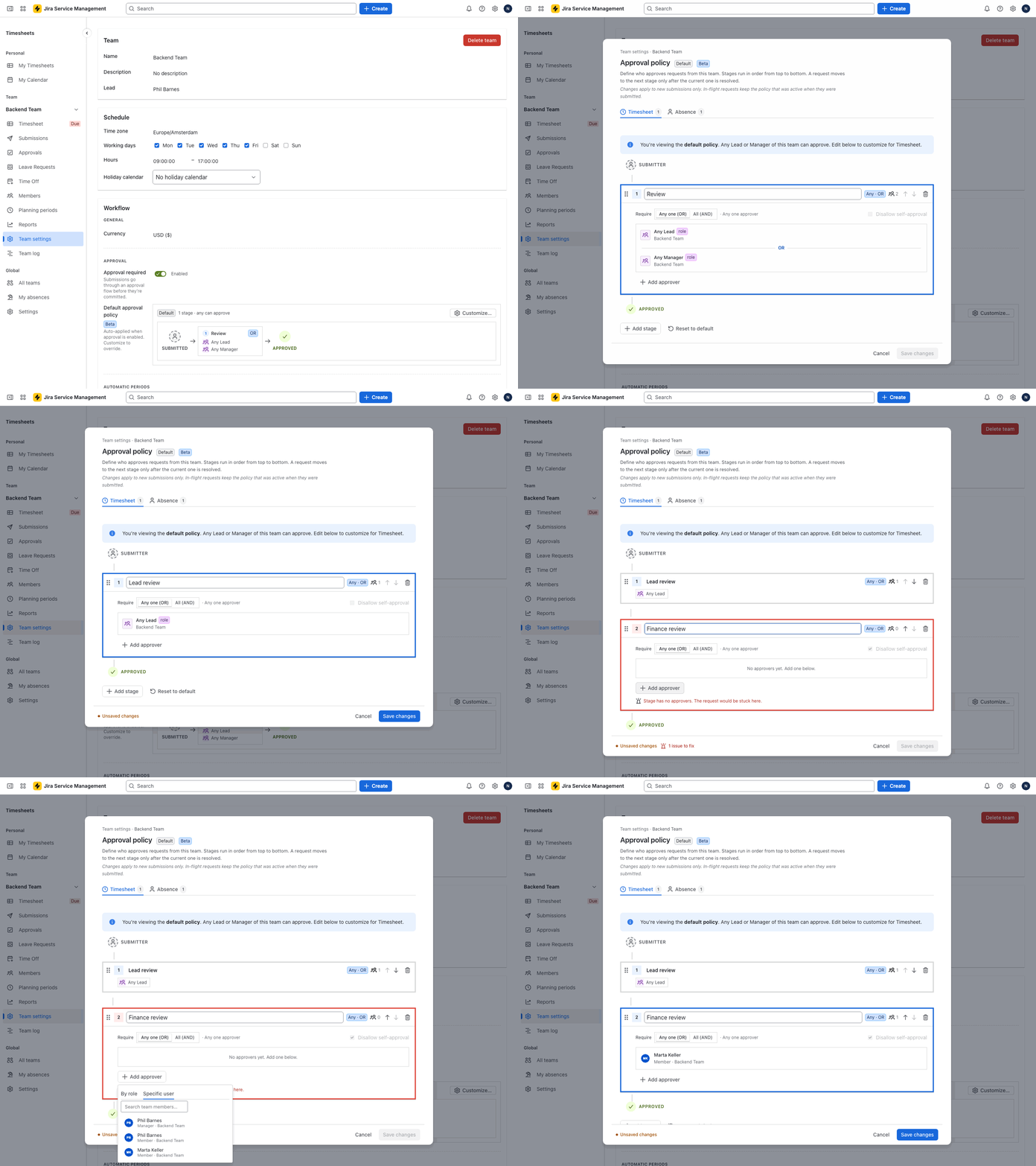
What stages buy you is the audit trail: each approval is recorded separately, so a year later you can show that the hours passed both checks, by name and date. The full setup, including cross-team finance reviewers, the self-approval block and what a rejection at stage two does, is in our guide to multi-stage timesheet approvals.
FAQ
Can you approve worklogs in native Jira? No. There is no approval state, approver role, or lock for worklogs in Jira Cloud. You need an app or an external process.
Is there a free timesheet approval app for Jira? Yes, Timesheets for Jira is currently free for any team size while in early access, including multi-stage approvals. Most other timesheet apps gate approvals behind paid tiers.
Can the approver edit hours before approving? Not as part of the approval. The approval action is a decision: approve, or reject with a written reason, after which the person who logged the time corrects the hours and resubmits. Leads and managers can edit a team member's worklog through the regular timesheet if your process allows it, and every change lands in the audit log.
What happens if someone edits a worklog in Jira after approval? The edit goes through. Jira has no lock for worklogs, and Timesheets for Jira does not add one. When a timesheet is submitted, the hours are frozen in a snapshot, so the approved record keeps the numbers the approver saw. A later edit in Jira shows up in reports and in the worklog's audit history, but it cannot rewrite the approved snapshot.
Where to start
Answer the four design questions, pick one team, and run one full period with them before rolling out wider. A pilot period surfaces the awkward cases (people on two teams, a lead on vacation during close) while the stakes are low. You can try the flow in a live demo without installing anything.
Related: Multi-stage timesheet approvals in Jira, Jira worklogs by user and day: who worked on what.
Facts in this article were checked on August 19, 2026, against Jira Cloud. If you spot something outdated, tell us and we will fix it.