
How to Track Team Utilization in Jira From Worklogs
Jira Capacity and Plans show planned load, not hours spent. How to measure team utilization in Jira from worklogs, with leave and part-time schedules.
Team utilization in Jira is the hours your people logged against the hours they were available, and native Jira has half of that. It plans capacity well, but it does not add up worklogs per person, so the number you report to finance usually comes from a spreadsheet. Timesheets for Jira builds it from the worklogs and from each person's own schedule, leave and holidays included.
What Jira's Capacity view does, and where it stops
Jira Premium and Enterprise include individual capacity planning (Atlassian Support). You add Capacity to a space's navigation, add people and work, and allocate each person's weeks in hours, days or percentages. The plan covers the whole site rather than one project, and Rovo can help you import an existing spreadsheet.
Atlassian's help page lists what it does not cover:
- The work week is fixed at 40 hours, and custom working days and time tracking settings are not reflected. You can block out time with a row like "Leave", but a part-timer still starts from the same 40-hour base.
- Work goes in at epic level or higher, so stories, tasks and sub-tasks do not appear.
The page says nothing about worklogs, which is the gap that matters here. Allocations are what you plan, and the view never reads what was logged, so it tells you who is overloaded next month but has nothing to say about how loaded the team was last month.
Plans capacity: per team and per sprint
Plans (the Premium feature once called Advanced Roadmaps) has its own capacity model, older than the Capacity view. Capacity there belongs to a team and an iteration, not to a person, and you set it in story points or hours (Atlassian Support). A Scrum team with 40 hours of weekly capacity on two-week sprints plans against 80 hours per sprint, while Kanban teams get fixed one-week iterations (Capacity in scrum vs. kanban teams). A public holiday or a sick week means editing that sprint's capacity by hand (Change iteration capacity).
Plans divides a team's capacity evenly between its members, so a part-timer counts the same as everyone else, and an item uses up capacity only when it has a team, an estimate and either a sprint or dates inside that sprint (How your plan assigns capacity). It works from estimates, which is why it can warn you before a sprint is overbooked but cannot tell you afterwards how many hours people actually spent.
Utilization is measured in logged hours
Utilization for a period is the hours a person logged divided by the hours they were available. Someone with 32 available hours in a week who logged 28 ran at 87.5%, or 88% once rounded.
Both numbers are harder to get than they look. Available hours move with leave, public holidays and part-time contracts. Logged hours have to come from worklogs, because estimates change during a sprint and the Time Spent field on a work item adds up everyone's time with no dates attached.
A worklog records who spent the time, on which day and on which work item, and that survives what usually scrambles a sprint report: items moving between sprints, a new assignee, a fresh estimate. Per-person numbers do depend on the worklog's author, though. Time that an integration logs under its own account belongs to that account in every report, and the person who did the work looks underloaded.
What native Jira gives you for actual hours
JQL with worklogAuthor and worklogDate finds the work items someone logged time on in a month, looking only at the 1,000 most recent worklogs on each item, but the result is a list of items, not hours, and the Time Spent column next to each one is the total from everyone who ever logged on it. Atlassian's own knowledge base says there is "no existing native way to achieve this using JQL or Dashboard Gadgets" (Atlassian KB).
The Time Tracking report compares Original Estimate, Estimated Time Remaining and Time Spent for the work items in one version (Atlassian Support), so it answers "did we estimate this release well" rather than "who worked how much". Atlassian has said it still intends to retire it, together with User Workload and Version Workload, though the July 2026 date passed without a replacement or a new date (Atlassian Community).
The available-hours half is missing too. The Capacity view fixes the week at 40 hours and Plans splits team capacity evenly, so neither knows that one developer works 30 hours and another was out for three days.
Utilization from worklogs: expected hours against logged hours
Timesheets for Jira compares two numbers for every person on a team: the hours they were expected to work in a period and the hours they logged in Jira. The Capacity tab of the team's Reports page shows both per member, for this week, last month, the current quarter or any dates you pick.
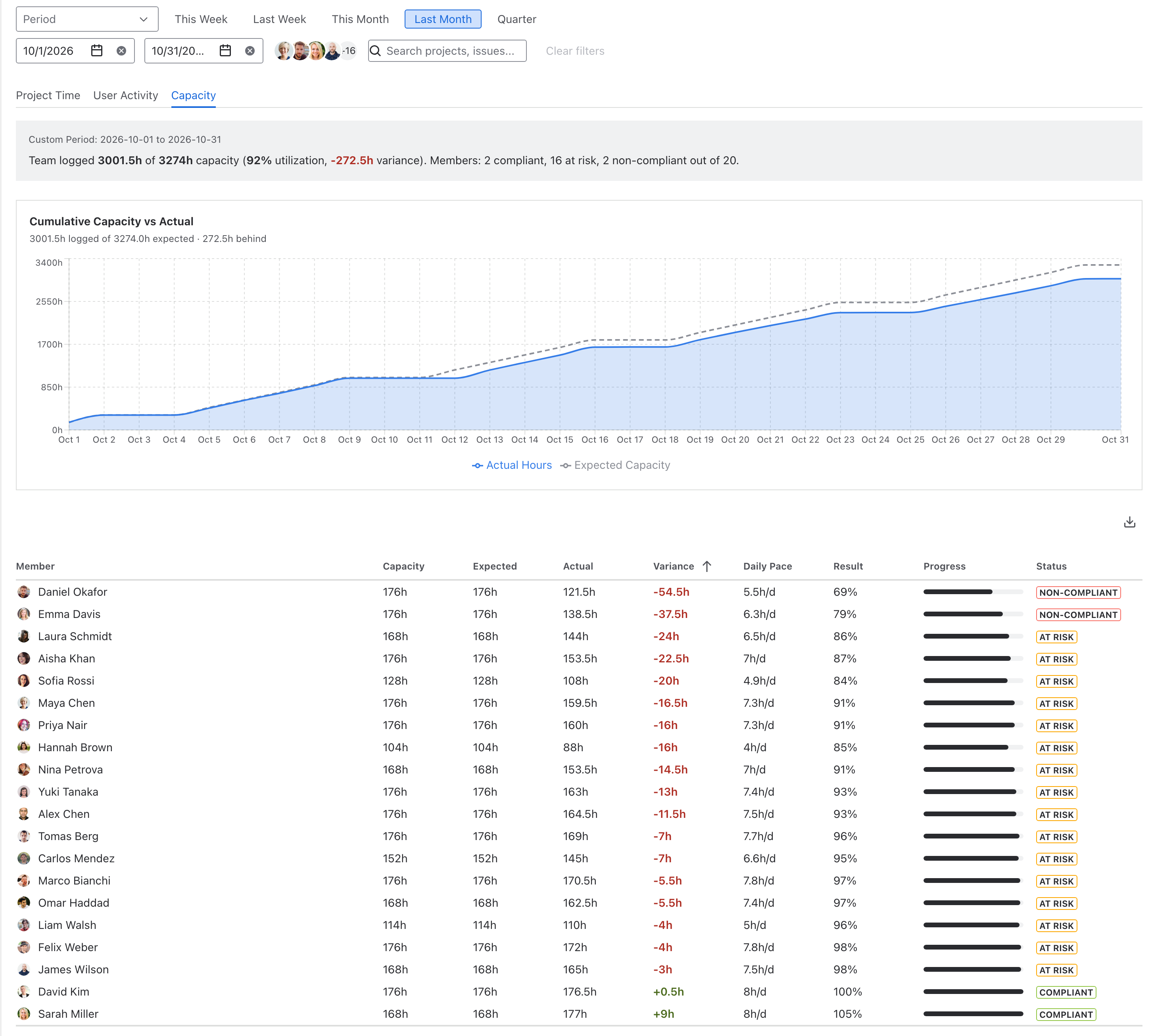
Expected hours start from the team schedule. A manager sets the working days, the time zone and the country holiday calendar once in Team settings, and each member then gets a daily capacity, 8 hours by default. For a part-timer you type a smaller number of whole hours, such as 4, into the Daily capacity column on the team's Members page, and the same person can have a different value in each team they belong to.
Time off comes out on its own. Public, company and team holidays are non-working days, an approved full-day absence removes the whole day from that person's capacity, and a partial-day absence removes only its hours. A week with one public holiday and two days of leave shows 16 expected hours for a full-timer instead of 40.
Logged hours come from the worklogs themselves, so the number does not depend on estimates or on a second form people forget to fill in. The User Activity tab next to it shows who logged on which day, Project Time splits the same hours by Jira project, and the Billable tab shows billable utilization against the same capacity. Each report tab exports to PDF for finance, and from the timesheet itself you can ask Rovo who logged the most last week.
Get Timesheets for Jira free on the Atlassian Marketplace
Related: Jira Worklogs by User and Day: How to See Who Worked on What, Jira Worklog Reports: Native Options and Their Limits, How to Track Billable and Non-Billable Hours in Jira.