
Tempo Forge Migration: What Breaks and How to Fix It
After the Tempo Forge migration, JQL filters, report bookmarks, automations and user access can break. What stops working and how to fix each one.
Your saved Tempo filters show errors. Report bookmarks open to nothing. A teammate opens Tempo and sees a white page, or a screen asking them to "choose which apps you would like on your Jira instance." If any of this started recently, your instance was probably migrated to Tempo's new Forge platform.
Tempo documents the changes, but spreads them across at least four help pages: the migration FAQs, Expected Changes in Timesheets on Forge, the Broken JQL Filter Finder guide, and the installation docs. This article collects what actually breaks, what you can fix, what you will discover about your worklog data while fixing it, and what to do before the migration reaches you. Every claim links to Tempo's own documentation or to public user reports, with dates.
Why this happens: the migration rolls out in random batches
Atlassian is retiring the Connect app platform, so Tempo is rebuilding Timesheets on Forge, Atlassian's current platform. Per Tempo's migration FAQs, the upgrade rolls out to customer instances in batches. You cannot schedule it, and you cannot opt out.
The one lever you do have: an admin can trigger the update manually before the batch reaches you, via Jira Settings, then Marketplace Apps, then View App Details, then Update. Two caveats from the same FAQ: if you update Timesheets manually, you must update the free Tempo Core app manually at the same time, and you can upgrade a sandbox independently of production to see what breaks before it counts. That turns a surprise migration on a random Tuesday into a planned change with a checklist. The checklist is at the end of this article.
Not sure whether the migration already reached you? Check the app version under Marketplace Apps: Timesheets 5.0.0 or higher and Tempo Core 6.0.0 or higher mean you are already on Forge, per the FAQs.
Break 1: JQL filters and report bookmarks
After the migration, Tempo's custom fields answer to different JQL syntax. From Tempo's Expected Changes page (last updated July 2026):
| Before Forge | After Forge |
|---|---|
Account = "Development" |
Account.name = "Development" |
"Tempo Team" = "Platform" |
"Tempo Team.name" = "Platform" |
cf[10000] = "value" |
cf[10000] ~ "value" (only the ~ operator works) |
Tempo's page says saved filters, links and bookmarks that use the old syntax stop working. In practice that reaches further, because boards, subscriptions and dashboard gadgets run those same filters. Tempo ships a Broken JQL Filter Finder that scans your instance and lists affected filters. It lives under Settings, then Forge Migration, in the Tempo sidebar, and it lists every filter with invalid JQL, not only the ones the migration broke. Each row opens the filter in Jira with its error.
| Filter | Owner | Clause that fails | Rewrite |
|---|---|---|---|
| Billable · Development | Maria Kim | Account = "Development" | Account.name = "Development" |
| Platform team board | Jonas Weber | "Tempo Team" = "Platform" | "Tempo Team.name" = "Platform" |
| Weekly finance digest | Tom Silva | cf[10000] = "Retainer" | cf[10000] ~ "Retainer" |
| Unbilled Q3 | Maria Kim | Account in ("Dev", "Ops") | Account.name in ("Dev", "Ops") |
Report bookmarks break too. Tempo's fix, per the same page, is to re-save each report before or after the upgrade.
Both problems are fixable. Neither fix is automatic. Someone has to walk through every affected filter and report by hand, and on an instance with years of history that list can run long. Budget real hours for it.
Not a break, but what you find while checking: worklogs in Jira are authored by Tempo, not by people
Many admins meet this one for the first time during the migration cleanup, and blame the migration. It is older than that.
Tempo Cloud keeps worklogs in its own database and syncs them to Jira through an app identity, not through the user who logged the time. Tempo's own knowledge base explains the design: worklogs in Jira are authored by a "3rd-party plugin user (Tempo Timesheets)" so that Tempo's own permissions can apply, and there is no setting to change it. A Community thread from May 2022 shows the same thing in the Jira API, with Tempo support confirming it is intentional. Forge changed the label, from "Tempo Timesheets" to "Tempo Service", and nothing else about who Jira records as the author.
A public Marketplace review by Luis M. López Cejas (June 10, 2026, currently the most-upvoted recent review on Tempo's listing) describes what that means on the Jira side today:
worklogAuthor = currentUser()returns zero results for any Tempo-tracked user. There is no JQL way to query "my worklogs."- Native Jira reports, dashboards, and gadgets that group by worklog author show Tempo Service as the only contributor.
- BI tools, compliance exports, and AI assistants that read Jira worklogs cannot tell who did the work.
- If you ever migrate away from Tempo, the worklogs left in Jira carry no real author. Rebuilding authorship means a full export from Tempo's API.
To be fair to Tempo: the data is not lost. Authorship lives inside Tempo's own database, and Tempo's reports and API return it correctly. The gap is on the Jira side, for everything outside Tempo that reads worklogs, and it has been there for years. If you are checking filters anyway, this is the moment to check whether any dashboard, export or integration of yours assumed Jira knew who logged the time. What native Jira reporting can and cannot do with worklogs, independent of any app, is covered in our worklog reports guide.
Break 2: automations that touch the Account field
If your Jira automation rules set or check Tempo's Account field, they need rework. Per Expected Changes, the Account field no longer appears in the field pickers for Then actions and conditions.
Tempo documents two workarounds:
- For conditions: replace the field condition with a JQL condition. Tempo's own example is
Account IS EMPTY; the new syntax works there too, for exampleAccount.name = "Development". - For actions: use the Additional fields JSON box in the Edit issue action. Tempo's documented example for copying an account from the parent issue:
{"fields": {"Account": {"id": "{{issue.parent.Account.id}}"}}}.
Inventory your rules before the migration. Search your automation list for any rule that mentions Account or Tempo Team, and note which pattern each one needs.
Break 3: regular users locked out
Two public reports show a failure mode where the migration leaves regular users unable to open Tempo at all.
Axel Steffen (Marketplace review, July 23, 2026) was greeted with "Choose which apps you would like on your Jira instance" instead of his timesheet. As a regular user he could not act on that screen, and he reports losing reconstructable billable hours while locked out. Tempo's product manager replied that the instance likely ended up with Tempo Core installed but Tempo Timesheets missing, and that only a Jira admin can fix it by reinstalling Tempo Timesheets alongside Tempo Core.
A separate Community thread from August 27, 2026 reports Tempo opening as a blank white page after the migration. The accepted answers point to post-migration admin steps and Tempo support.
The pattern in both cases: the person who hits the problem is a regular user, and the person who can fix it is an admin. If you administer Jira, tell your users what to expect before the migration, and tell them to come to you, not to the app store screen Jira shows them.
Smaller breaks worth knowing about
- The keyboard shortcuts W (log time) and G then T (open My Work) stop being global. Per Tempo's Changes to Keyboard Shortcuts page they are now Atlassian Command Palette actions, and they only work after you open the palette once per session.
- Admins can no longer test user setups through impersonation: per the Expected Changes page, it breaks the app's permission exchange, and Tempo asks you to reference ECO-244 in support tickets.
Pre-migration checklist for Jira admins
Run this before the batch reaches you, or before you trigger the update manually.
- Run Tempo's Broken JQL Filter Finder and export the list of affected filters. Assign an owner to rewrite them.
- List report bookmarks your team actually uses. Plan to re-save each one.
- Search automation rules for Account and Tempo Team. Mark each rule for the JQL-condition or Additional-fields-JSON rework.
- Check which dashboards, gadgets, and BI exports assume Jira knows who logged a worklog. They have been reading "Tempo Timesheets" as the author all along; decide whether Tempo's API can replace them, and who rebuilds what.
- Write a two-line note to your users: what changes, what to do if Tempo shows an app-selection screen or a white page (answer: contact you, not the screen).
- If you have a sandbox, upgrade it first. Tempo confirms sandbox and production upgrade independently, so you can measure the broken-filter list on a copy before production feels it.
- Decide: update manually on your schedule, or wait for the batch on Tempo's schedule. The manual route is the only way to pick the date. If you go manual, update Tempo Core in the same sitting, otherwise you risk the locked-out-users state described above.
What does not get fixed, and when to look at alternatives
The JQL syntax, the bookmarks, and the automations are one-time repair work. The authorship gap is not repair work at all: it is how Tempo Cloud stores data, before Forge and after it, and no amount of configuration makes Jira record the person who logged the time.
If native Jira worklogs with real authors matter to you (for JQL, for compliance exports, for BI, or for keeping your data portable), the fix is an app that writes standard Jira worklogs as the user. That is how Timesheets for Jira works: worklogs are native Jira worklogs, authored by the person who logged them, worklogAuthor = currentUser() keeps working, and approval chains run on top of those native worklogs. This is what Jira itself shows for a worklog logged through the app:
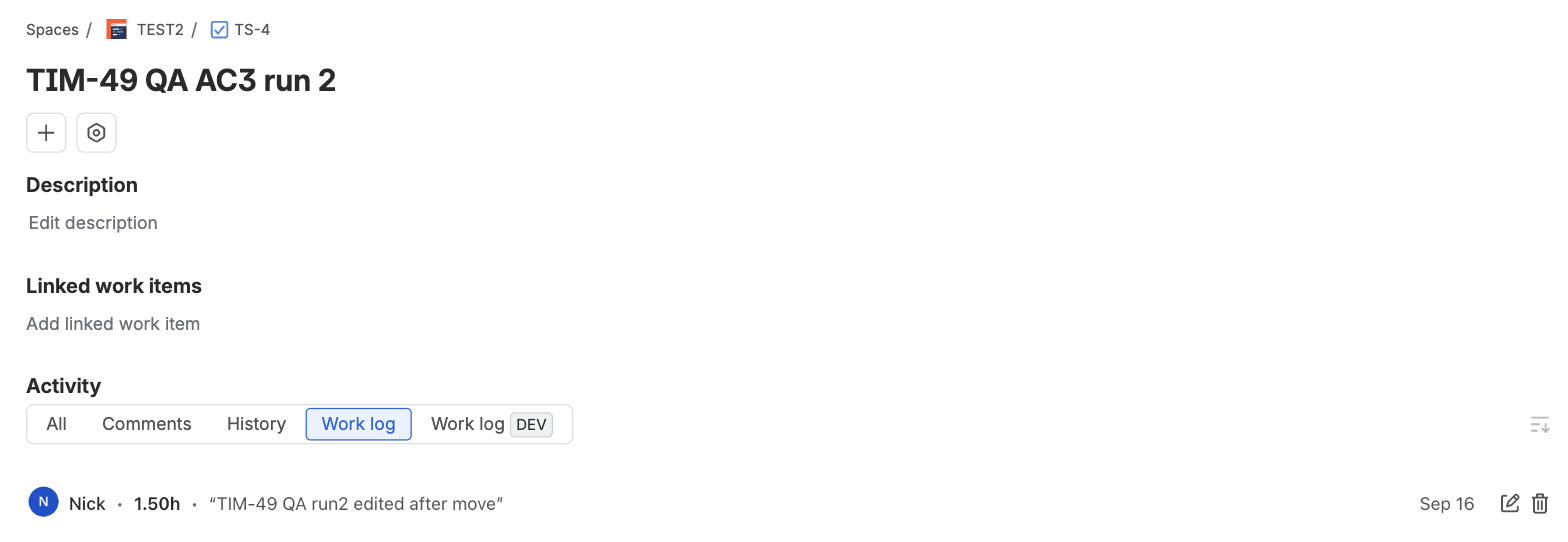
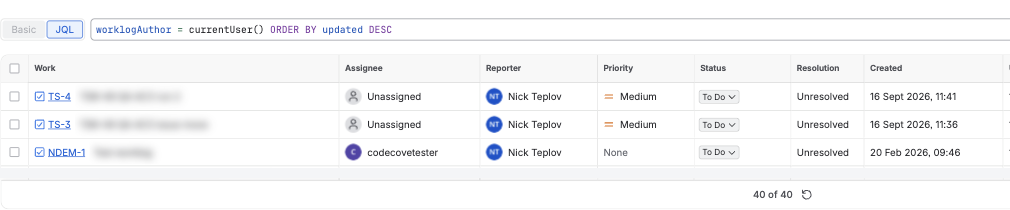
worklogAuthor = currentUser() on the same instance, returning 40 issues.If your team depends on Tempo's accounts, plans, and cost tracking, staying on Tempo and adapting to its API may still be the pragmatic call. The point is to make that decision knowing which breaks are temporary and which are permanent.
One limitation to state plainly: if you leave Tempo, your historical worklogs in Jira still carry the app identity as author. A new app fixes authorship going forward, not retroactively.
Facts in this article were checked on September 17, 2026, against Tempo's documentation and knowledge base, public reviews and a live Jira Cloud instance.